Your users found the bug. Let them tell the AI that built your app.
You made an app on Lovable, Bolt, Replit, Bubble or v0 — and now real people use it. When something breaks, they text you "it's broken" and you guess. FieldTest gives them a small panel inside your app: they say what went wrong in their own words, circle it on a picture, and you get one record file to hand your AI with one instruction: fix what you can.
<script src="testdrive.js"></script>
One tag plus a small folder next to your page. No account. No SDK. No build step.
Get early access
The first 10 builders get hands-on setup from us. Everyone after that joins the waitlist and gets the one line to paste as spots open. We keep it small on purpose, so every builder gets a real answer. Leave your email. No spam, no sharing. Signups go to a Google Form — the one outside service this page touches, and only when you press the button.
Your app — a to-do list, say
A scripted illustration of the flow (kit v0.1.1a; the real panel's mechanics differ in small ways). The genuine article, unretouched:
See a real screenshot of the panel in the demo app
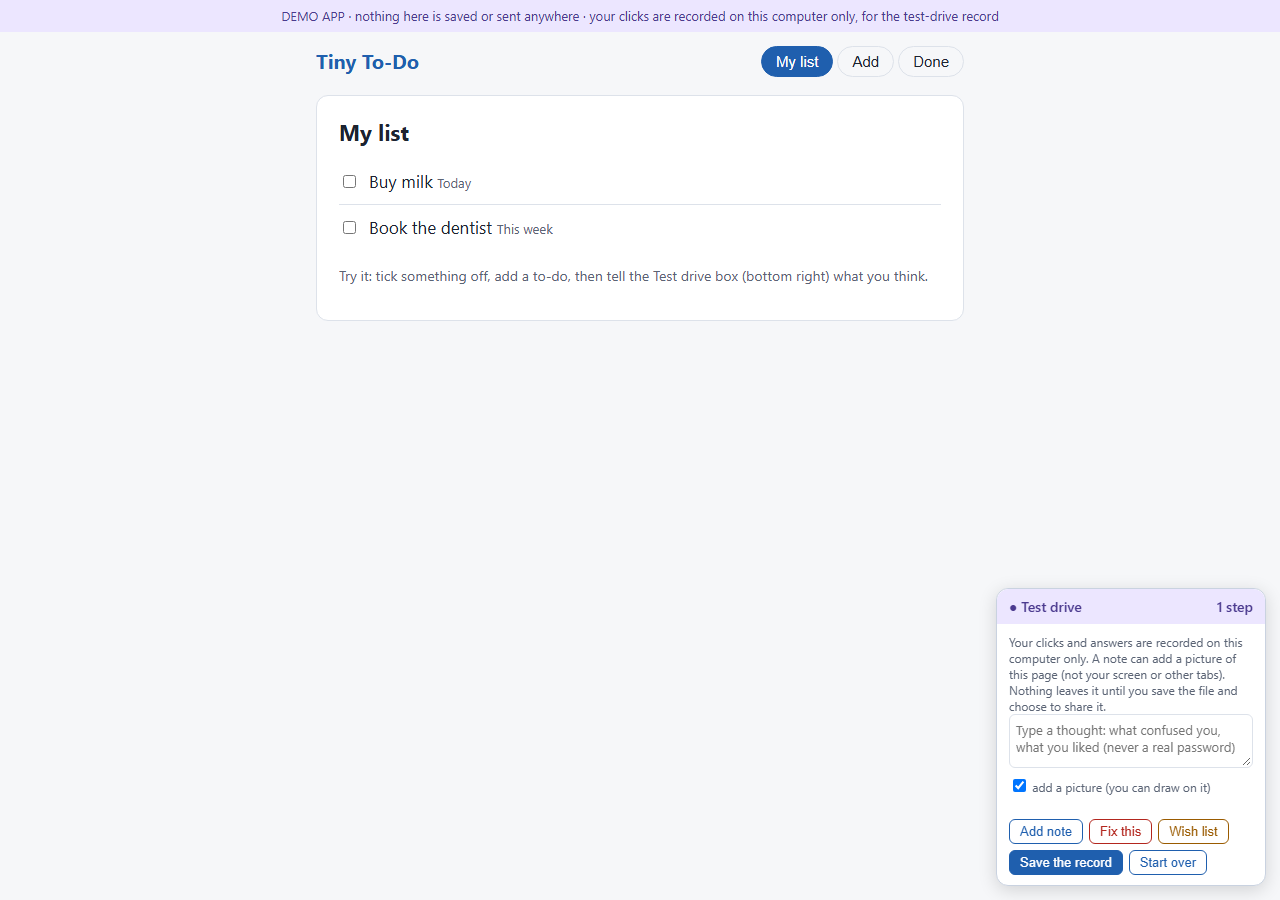
Kit v0.1.1. The panel's wording is ours; the app behind it is yours.
Why builders want this
AI builds fast. It just can't hear your users.
Not a support inbox nobody writes to. A small panel inside your app, where "this confused me" gets said the moment it happens.
Every click, every note, every picture with their circle on it, in order, in one file. Nothing to translate into a ticket.
Hand the file to the AI that builds your app: "read this and fix what you can." It sees exactly what your user saw.
How it works
Four steps, and three of them aren't yours.
Paste one line.
One <script> tag into your app's page, plus a small folder next to it. No account, no SDK, no build step.
They tap the panel.
They write what they mean in plain words, tag it Fix this or Wish list, and can add a picture of the page with a circle or an arrow drawn on it.
You get the record.
They press Save the record and get one self-contained file to send you. If your app has a backend, set one https address instead and a Send button appears for them.
The fix ships.
Attach the record in the chat where your AI builds your app: "Read this record. Fix what you can now. List the rest." Then tell your user: ready to test.
Private by design
The recorder phones no one — by design, and self-tested.
Records are built in your user's own browser and stay there. Nothing leaves their computer until they press Save and choose to send the file — or press Send, if you set an address. We never see a record unless someone sends it to us; if you set a Send address, records go to you, the builder — tell your users what you keep. And honestly: your app is your page, so your users are trusting you the way they trust any form on it. (One technical caveat, disclosed in the kit: the picture library may re-fetch the page's own images while drawing.)
- Never recorded: password fields, and fields the browser marks as card numbers or passwords (
cc-*,current-password,new-password). - Blanked in text and in pictures: form fields named like
pass,pwd,ssn,card,cvv,iban,routing— even if a "show password" switch made them visible. Other text on the page is drawn as it appears. - Your call: anything you mark
data-td-privateis skipped in the recorded words. In pictures, mark the fields themselves — images and inputs inside a marked container aren't blanked yet (v0.1.2 work, and we say so rather than pretend). Query strings and tokens are dropped from page names. - No video, no screen recording, no keystroke logging. Typed answers in ordinary fields are recorded — tell testers not to type what they wouldn't want in the record.
- Pictures are a redraw of the page, not a screen grab — of the whole page, including parts scrolled out of view, so they can include other people's information shown there. They're erased from the browser after a successful Save or Send, and on Start over.
Before you hand a record to an AI: a record shows what was on the page — names, answers, file names, pictures. Open it and look before you paste it anywhere, and keep records that show other people's health, financial or children's data out of consumer AI chats. Your app, your users, your call.
Pricing
Enterprise-grade user testing without the enterprise license fee.
One app. The panel, the record, the pictures with drawing, the Fix this / Wish list tags. The record stays on your user's computer until they send it.
Early-adopter rate for builders who back us while we're new. Billed monthly, and locked at this rate as long as you stay subscribed.
More than one app, and what comes next. We will list what's in Pro when it exists, not before.
Working numbers — final pricing confirmed at launch.
Questions people ask
Straight answers, including the unfinished parts.
What gets recorded?
Page opens (and route changes inside a single-page app) with the page's title, clicks on buttons, links and checkboxes with their visible labels, the answers your user types or picks (with the question's label where the field has one), the names of files they attach, their notes, their Fix this / Wish list tags, and the pictures they chose to keep. Each step carries the time and the page name.
How does my AI get the record?
Today, by your hand: your user sends you the file (email, text, a shared drive), and you attach or paste it into the chat where your AI works, or point it at the file on your machine. Each record is one ordinary HTML file with the steps and pictures inside it. An inbox that delivers records to you without email is not built yet — when it exists we expect it to be the heart of Pro, and we will say so then, not before.
Will it work on Lovable, Bolt, Replit, Bubble, Base44, v0?
It is a plain script tag plus a small folder of files, so it works wherever you can add a script tag to your app's HTML and host two small files next to it. What each platform's own documentation says (read 2026-10-27):
- Bubble: the paste step is documented (Settings > SEO / metatags: "Some services require code to be pasted in the header of the page's HTML. Paste the code here.", Bubble's manual) — but Bubble can't host the kit's two files, so this route needs the hosted kit address that comes with your invite (not live yet; the install page says so plainly). Not yet tested by us.
- Base44: the paste step is documented (ask the AI chat, or the dashboard's Code tab) — same hosted-kit dependency as Bubble, same honest not-live-yet label. Not yet tested by us.
- Lovable: has a code editor for your project's files, on paid plans (Lovable's docs). Asking the AI to add the tag may also work; we have tested neither: UNVERIFIED.
- Bolt: has a code view where you can open
index.html, paste, and save (Bolt's docs; read-only on Safari and mobile). Not yet tested by us: UNVERIFIED. - Replit: Replit's own docs do not address custom script tags. Your Agent can likely add the tag to
index.htmlin a web project, but that is our guess: UNVERIFIED. - v0: v0 projects are Next.js with no
index.html; the tag would go inapp/layout.tsx, which is harder if you do not touch code: UNVERIFIED.
We will test each platform with our first builders and turn every UNVERIFIED above into a plain yes or no. Known limits everywhere: not inside iframes; pages with a strict content-security policy may block the panel; clicks on plain divs are not recorded unless you add data-td-click; pictures can miss images from other sites.
The two-minute install, step by step, platform by platform →
Is this a bug tracker or an analytics tool?
No. Nothing is sent anywhere on its own and nothing is reported to anyone. From the moment the page opens, the recorder keeps a local list of steps (clicks, answers, route changes) on your user's computer, so the record is complete when they choose to save it — that list leaves their machine only by their Save, or their press of Send if you set an address. A person opens the panel and says what they mean. One tester, one record.
Can I test my own app with it, on any site?
Coming next: a browser extension for testing your own app on any page, without pasting anything. Today the recorder lives inside your app, which is the point: it is for your users.
Why is the script still called testdrive.js?
FieldTest grew out of a working tool we called Test Drive in the shop. The kit file keeps its working name until the next version so that nothing breaks for our first testers; the rename ships with v0.1.2.
One app, one builder, a handful of testers so far. On our first internal drive (self-reported) a user took 43 steps in 29 minutes and four fixes shipped within the hour. That is a pilot, not a market proof. The kit is shared on request while the license is set.